
Competency Framework Setup
The Competency Framework assigns required competencies and benchmark levels to employees sharing the same Company, Department, Job Position, and Grade Level.
Create General Framework Information
Navigate to .
Click New and configure:
Framework Name: Descriptive name indicating unit, position, and level (e.g., DOM Competency Framework – Content Marketing G8).
Company: Select applicable company.
Department: Select department from organizational structure.
Job Position: Select job title.
Grade Level: Select employee grade level.
Category Weight: Enter percentage weight for each category: - Core Competency (%) - Professional Competency (%) - Leadership Competency (%)

Important
The sum of category weights must comply with company evaluation policy. These weights are used to calculate the benchmark score for each competency.
Add Competencies to Framework
Under the Competencies tab, click Add a line and configure:
Competency: Select from the Competency Dictionary (code auto-populates).
Importance Level: Enter value from 1 to 5.
Required Level: Enter target benchmark level from 1 to 5.
Benchmark Score: Automatically calculated on save (read-only).
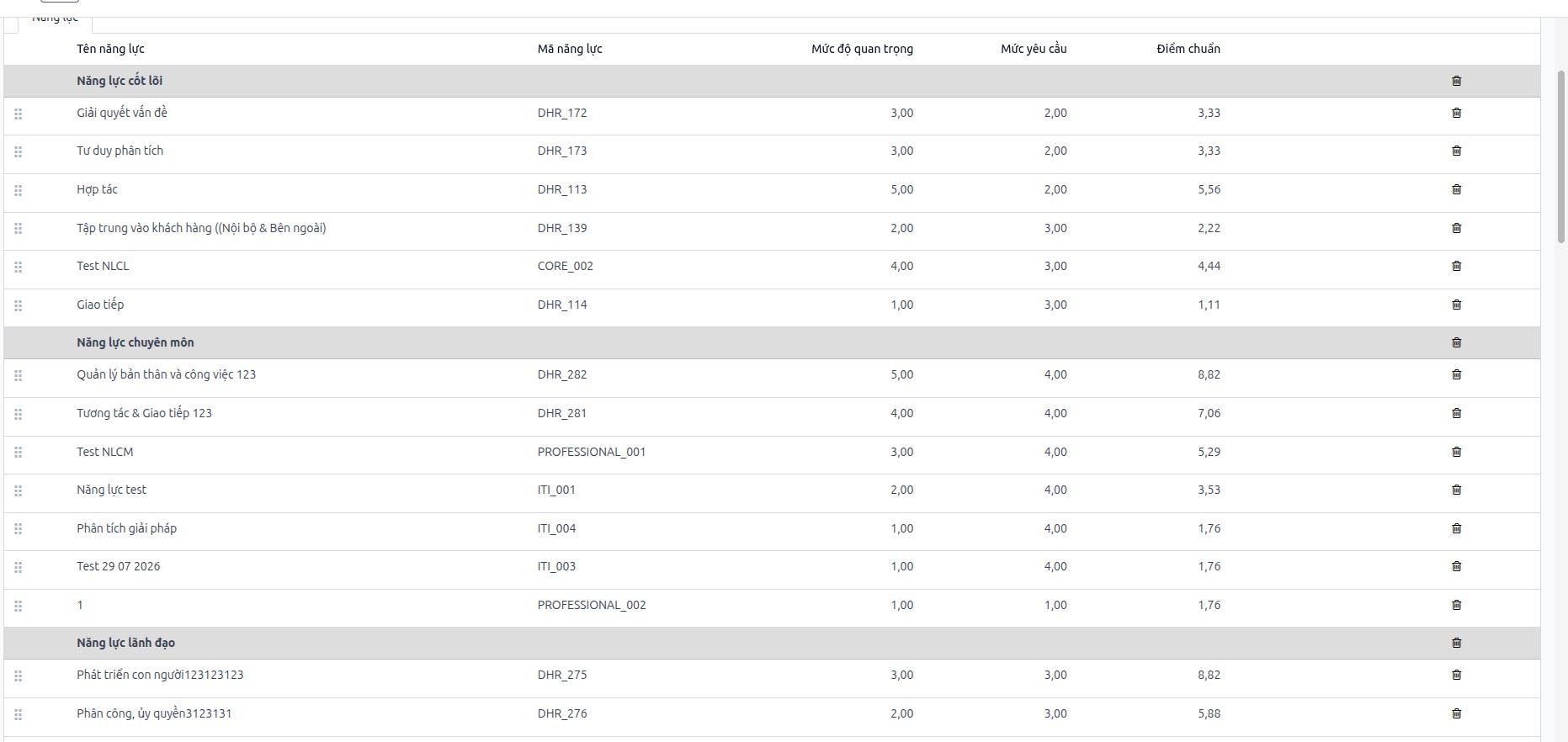
Quantity Limits by Category:
Core Competencies: Maximum 6 competencies.
Leadership Competencies: Maximum 6 competencies.
Professional Competencies: No quantity limit.
Benchmark Calculation Formula
The benchmark score for each competency in the framework is calculated using the following formula:
Where:
Importance Level: The priority level of the competency (scale from 1 to 5).
Category Weight (%): The percentage weight of the competency category (Core, Leadership, or Professional).
Total Importance Level: The sum of importance levels of all competencies within that category in the framework.
Calculation Example:
Competency: Communication (belongs to Core Competencies).
Importance Level = 4.
Core Category Weight = 30%.
Total Importance Level of all Core Competencies in Framework = 20.