Phòng ban
All employees in the Employees app fall under specific departments within a company.
Tạo phòng ban mới
To make a new department, navigate to , then click New in the top-left to reveal a blank department form. Fill out the following information on the department form:
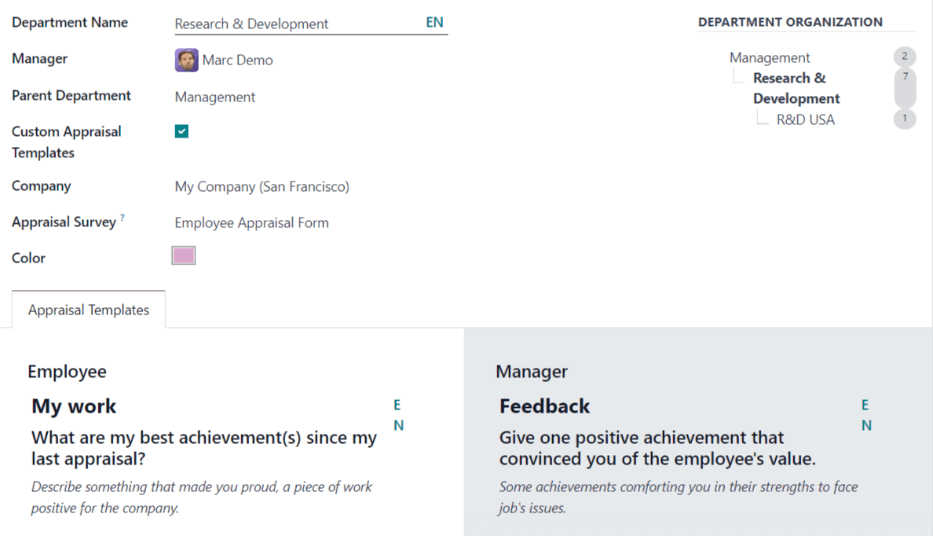
Tên phòng ban: nhập tên cho phòng ban.
Người quản lý: sử dụng menu thả xuống, chọn người quản lý phòng ban.
Phòng ban cấp trên: nếu phòng ban mới được đặt trong một phòng ban khác (có phòng ban cấp trên), hãy chọn phòng ban cấp trên bằng menu thả xuống.
Custom Appraisal Templates: if employees in this department require a specific appraisal form that is different from the default appraisal form, tick the checkbox. If this option is activated, an Appraisal Templates tab appears below the form. This field only appears if the Appraisals app is installed.
Company: using the drop-down menu, select the company the department is part of.
Appraisal Survey: using the drop-down menu, select the default survey to use for the department when requesting feedback from employees. This field only appears if the Appraisals app is installed, and the 360 Feedback option is enabled in the settings.
Color: select a color for the department. Click the default white color box to display all the color options. Click on a color to select it.
Appraisal Templates tab: this tab only appears if the Custom Appraisal Templates options is activated on the form. Make any desired edits to the appraisal form. The appraisal form is used for appraisals for all employees within this department.
After the form is completed, click the (cloud upload) icon to manually save the changes. When saved, a Department Organization chart appears in the top-right of the department card.
Ghi chú
Biểu mẫu tự động lưu khi nhập dữ liệu, tuy nhiên sơ đồ Tổ chức Phòng ban không xuất hiện cho đến khi biểu mẫu được lưu thủ công. Nếu biểu mẫu không được lưu, sơ đồ Tổ chức Phòng ban sẽ hiển thị khi mở thẻ phòng ban từ bảng điều khiển Phòng ban.
Xem thêm
Refer to the Đánh giá nhân sự documentation for more information.
Bảng điều khiển phòng ban
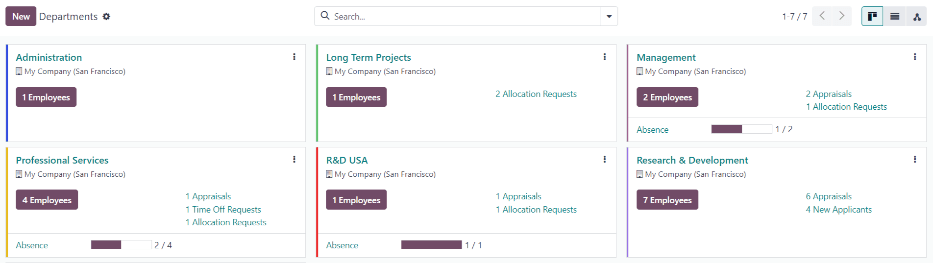
To view the currently configured departments, navigate to . All departments appear in a Kanban view, by default, and are listed in alphabetical order.
Chế độ xem kanban
Each department has its own Kanban card on the main Departments (Kanban) dashboard view, that can display the following information:
Department name: the name of the department.
Company: the company the department is part of.
Nhân viên: số lượng nhân viên trong phòng ban.
Đánh giá: số lượng đánh giá được lên lịch cho nhân viên trong phòng ban.
Yêu cầu nghỉ phép: số lượng yêu cầu nghỉ phép chưa được phê duyệt cho nhân viên trong phòng ban đang chờ phê duyệt. Mục này chỉ xuất hiện nếu có yêu cầu cần phê duyệt.
Yêu cầu phân bổ: số lượng yêu cầu phân bổ chưa được phê duyệt cho nhân viên trong phòng ban đang chờ phê duyệt. Mục này chỉ xuất hiện nếu có yêu cầu cần phê duyệt.
New Applicants: the number of new applicants for a position in this department. This only appears if there are new applicants.
Báo cáo chi phí: số lượng nhân viên trong phòng ban có báo cáo chi phí đang mở cần phê duyệt. Mục này chỉ xuất hiện nếu có báo cáo chi phí nào đang chờ phê duyệt.
Absence: the number of absences for the current day.
Thanh màu: màu đã chọn cho phòng ban xuất hiện dưới dạng thanh dọc ở phía bên trái của thẻ phòng ban.
Ghi chú
Click on an alert in a department card, such as Time Off Requests, to reveal a list view of the requests to approve. This list includes all open requests to approve, not just from the specific department.
The default view for the Departments dashboard is a Kanban view. It is possible to view the departments in two other forms: a list view and a hierarchy view.
Xem danh sách
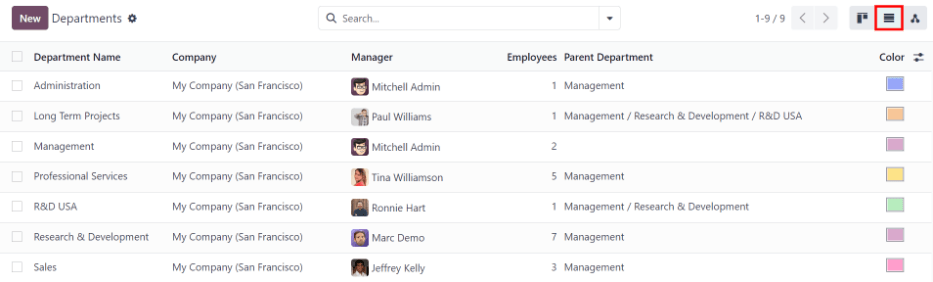
Để xem các phòng ban ở chế độ xem danh sách, nhấp vào biểu tượng (danh sách) ở góc trên bên phải. Các phòng ban xuất hiện ở chế độ xem danh sách, hiển thị Tên phòng ban, Công ty, Người quản lý, Nhân viên, Phòng ban cấp trên, và Màu của từng phòng ban.
Các phòng ban được sắp xếp theo thứ tự bảng chữ cái theo Tên phòng ban, theo mặc định.
Mẹo
When in list view, departments can be managed in batch by selecting one or multiple record's checkbox, then select the Actions button to reveal a drop-down menu of actions.
Chế độ xem phân cấp
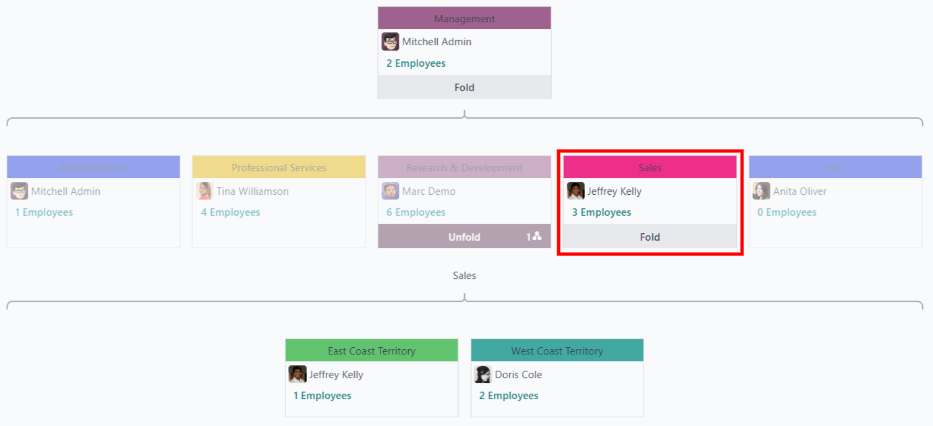
To view the departments in a hierarchy view, click the (hierarchy) icon in the top-right corner. The departments appear in an organizational chart format, with the highest-level department at the top (typically Management), and all other departments beneath it. All child departments of the first-level child departments are folded.
Each department card displays the Department Name, the Manager (and their profile image), the Number of Employees in the department, and the ability to expand the department (Unfold) if there are child departments beneath it.
Nhấp vào nút Mở rộng trên thẻ phòng ban để mở rộng nó. Sau khi mở rộng, nút Mở rộng chuyển thành nút Thu gọn. Để thu gọn phòng ban, nhấp vào nút Thu gọn. Chỉ có một phòng ban trên mỗi hàng có thể được mở rộng tại một thời điểm.
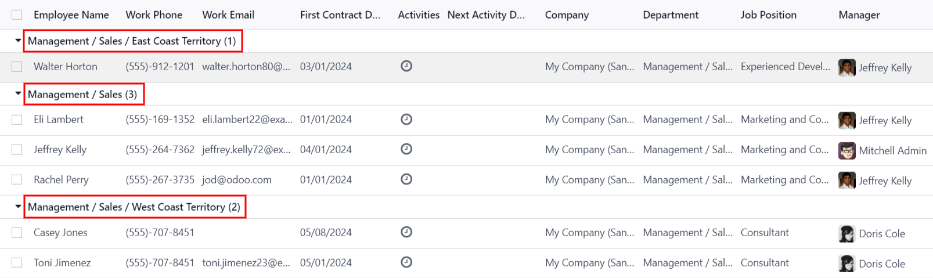
Click anywhere on a department card to open the department form. Click the (#) Employees smart button to view a list of all the employees in that department, including all employees in the child departments beneath it, organized by individual department.
Example
In the hierarchy view, if the (2) Employees button on the Management card is clicked (the highest-level department card), all employees appear in a list view, grouped by department. This is because all departments are children of the Management department.
If the (3) Employees button in the Sales department card is clicked, the employees from the Sales department, as well as its two child departments (East Coast Territory and West Coat Territory), appear in the list.