
Máy in ePOS
ePOS printers are designed to work seamlessly with Point of Sale systems. Once connected, these devices automatically share information, allowing for direct printing of tickets from the POS system to the ePOS printer.
Cấu hình
To use an ePos printer in Point of Sale:
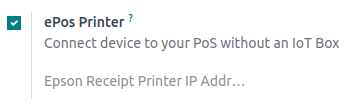
Activate the ePos Printer feature.
Fill in the field with your ePos IP address.
Ghi chú
When the printer connects to a network, it automatically prints a ticket with its IP address.
Máy in ePOS được hỗ trợ trực tiếp
The following ePOS printers are directly compatible with Odoo without needing an IoT system.
Epson TM-m30 i/ii/iii (Wi-Fi/Ethernet models only; Recommended)
Epson TM-H6000IV-DT (Chỉ máy in biên lai)
Epson TM-T70II-DT
Epson TM-T88V-DT
Epson TM-L90-i
Epson TM-T70-i
Epson TM-T82II-i
Epson TM-T83II-i
Epson TM-U220-i
Epson TM-m10
Epson TM-P20 (Wi-Fi® model)
Epson TM-P60II (Biên lai: dòng Wi-Fi®)
Epson TM-P60II (Peeler: dòng Wi-Fi®)
Epson TM-P80 (Wi-Fi® model)
ePOS printers with IoT system integration
Các máy in sau yêu cầu hệ thống IoT để tương thích với Odoo:
Epson TM-T20 family (không tương thích phần mềm ePOS)
Epson TM-T88 family (không tương thích phần mềm ePOS)
Epson TM-U220 family (không tương thích phần mềm ePOS)
Quan trọng
Epson printers using Wi-Fi/Ethernet connections and following the EPOS SDK Javascript protocol are compatible with Odoo without needing an IoT system.
Thermal printers using ESC/POS are compatible with an IoT system.
Epson printers using only USB connections are compatible with an IoT system.
Epson printers that connect via Bluetooth are not compatible.