Sản phẩm
Odoo's Lunch app does not come with any products preconfigured. The individual products being offered must first be configured before orders can be placed.
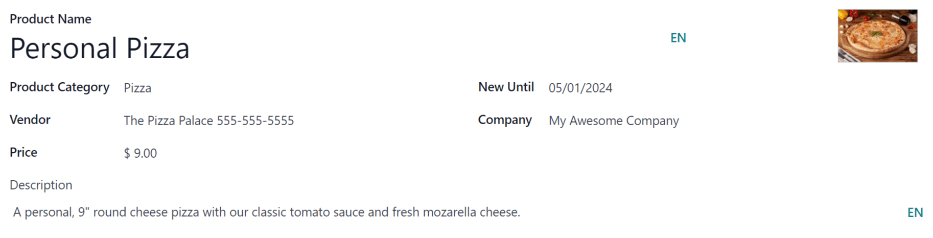
To add and configure products for the Lunch app, navigate to . Next, click the New button in the top-left corner, and a blank product form loads.
Nhập thông tin sau đây trên biểu mẫu:
Product Name: enter the name for the product. This field is required.
Product Category: using the drop-down menu, select the category this product falls under. This field is required.
Vendor: using the drop-down menu, select the vendor that supplies this product. This field is required.
Price: enter the price for the product. The currency is determined by the company's localization.
Description: enter a description of the product in this field. This description appears beneath the product photo when users are viewing the day's options.
New Until: using the calendar popover, select the date on which the product is no longer labeled as new. Until this date, a green
Newtag appears on the product.Company: if the product should only be available to a specific company, select it from the drop-down menu. If this field is left blank, this product is available for all companies in the database.
Image: hover over the image box in the top-right corner of the form, and click the (pencil) icon that appears. A file explorer pop-up window appears. Navigate to the image, then click Open.
Danh mục sản phẩm
Product categories organize the offerings in the Lunch app, and allows users to quickly filter them when reviewing the menu for the day.
Để thêm hoặc sửa đổi danh mục, điều hướng đến . Các danh mục có sẵn xuất hiện trong chế độ xem danh sách.
In the Lunch app, there are four default categories: Sandwich, Pizza, Burger, and Drinks.
Để thêm danh mục mới, nhấp vào nút Mới ở góc trên bên trái, và biểu mẫu danh mục trống sẽ tải lên.
Nhập tên vào trường Danh mục sản phẩm. Nếu danh mục dành riêng cho công ty và chỉ xuất hiện cho một công ty nhất định, hãy chọn Công ty từ menu thả xuống.
Nếu muốn, hãy thêm ảnh cho danh mục. Di chuột qua hộp hình ảnh ở góc trên bên phải và nhấp vào biểu tượng (bút chì) xuất hiện. Thao tác này sẽ mở cửa sổ bật lên trình duyệt tệp. Điều hướng đến hình ảnh, sau đó nhấp vào Mở.