
Worldline
Kết nối thiết bị đầu cuối thanh toán cho phép bạn cung cấp quy trình thanh toán liền mạch cho khách hàng và giúp công việc của thu ngân dễ dàng hơn.
Quan trọng
Worldline payment terminals require an IoT Box.
Worldline is currently only available in Belgium, the Netherlands and Luxembourg.
Odoo is compatible with Worldline terminals that use the CTEP protocol (e.g., the Yomani XR and Yoximo terminals). If you have any doubts, contact your payment provider to ensure your terminal's compatibility.
Cấu hình
Kết nối hệ thống IoT
Connecting a Worldline Payment Terminal to Odoo is a feature that requires an IoT system. For more information on how to connect one to your database, please refer to the IoT documentation.
Configure the protocol
Từ thiết bị đầu cuối, nhấp vào . Nhập mật khẩu kỹ thuật "1235789" và nhấp vào . Sau đó, nhấp vào . Nhấp OK ba lần trên các màn hình tiếp theo (Phiếu CTEP ECR, Chiều rộng phiếu ECR và Bộ ký tự). Cuối cùng, nhấn Dừng ba lần; thiết bị đầu cuối sẽ tự động khởi động lại.
Set the IP address
From your terminal, click on . Enter the technician password "1235789" and click on . Then, click on (TCP physical configuration screen) (TCP Configuration client screen).
Finally, set up the hostname and port number.
Hostname
Example
10.30.19.4:8069.Mẹo
Your IoT system's IP address is available on the IoT system's card in the IoT app.
Port number
On the Port number screen, enter 9001 (or 9050 for Windows) and click on (ECR protocol SSL no) . Click on Stop three times; the terminal automatically restarts.
Cảnh báo
For the Windows virtual IoT, the 9050 port must be added
as a Windows Firewall exception.
Cấu hình phương thức thanh toán
Enable the payment terminal in the application settings and create the related payment method. Set the journal type as Bank and select Worldline in the Use a Payment Terminal field. Then, select your terminal device in the Payment Terminal Device field.
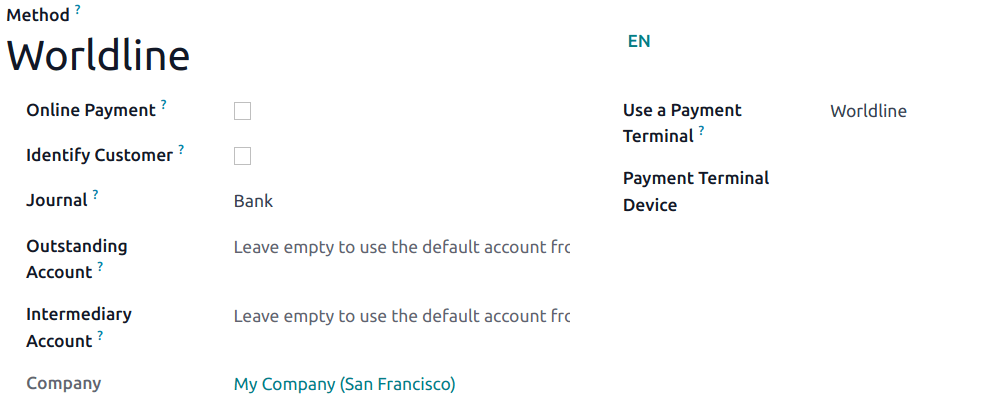
Once the payment method is created, you can select it in your POS settings. To do so, go to the POS' settings, click Edit, and add the payment method under the Payments section.
Mẹo
Technician password:
1235789To reach Wordline's technical assistance, call
02 727 61 11and choose "merchant". Your call is automatically transferred to the desired service.Configure the cashier terminal if you have both a customer and a cashier terminal.
To avoid blocking the terminal, check the initial configuration beforehand.
Set a fixed IP to your IoT Box’s router to prevent losing the connexion.