
Recruitment analysis
The Recruitment Analysis report allows recruiting departments to see which job positions have the most applicants, which have the most referrals, and how long it takes for applicants to move through the pipeline.
Biết có bao nhiêu ứng viên cho mỗi vị trí công việc cụ thể, cùng với số liệu thống kê về số lượng được tuyển và bị từ chối, có thể cung cấp những thông tin giá trị. Thông tin này có thể hỗ trợ nhóm tuyển dụng điều chỉnh chiến lược để thu hút những ứng viên mong muốn nhất.
Báo cáo phân tích tuyển dụng
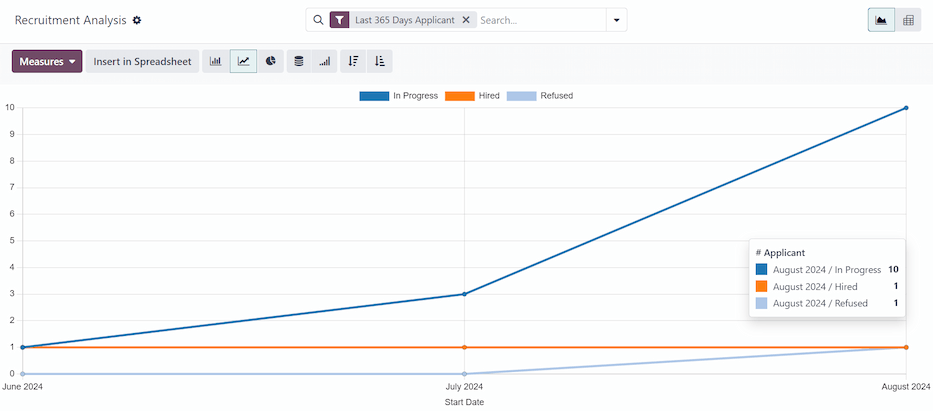
Start by navigating to . This presents a line chart of all applicants for the last year.
Ba chỉ số được mã hóa màu riêng biệt được trình bày: Đang tiến hành, Đã tuyển và Đã từ chối.
Di chuyển con trỏ qua một tháng của biểu đồ và một cửa sổ bật lên xuất hiện, hiển thị các con số cụ thể cho tháng đó.
Chế độ xem bảng trục
For a more detailed view of the information in the Recruitment Analysis report, click the (Pivot) icon in the top-right corner. This displays all the information in a pivot table.
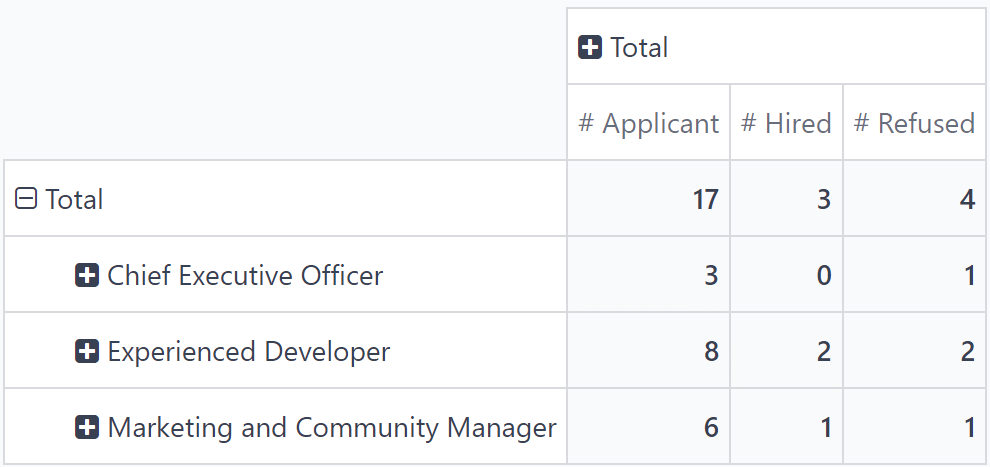
In this view, the job positions are displayed in the rows, and the columns display the total numbers of applicants, including how many of those applicants were hired or refused. The displayed information can be modified, if desired.
In this example, there are 17 total applicants. Out of that, three have been hired, and four refused. The Experienced Developer position has eight total applicants, two of which were hired, and two were refused.
Trường hợp sử dụng: ứng viên có giới thiệu
To get a better understanding of how effective the company's referral program is, the Recruitment Analysis report can be modified to show how many applicants were referred by current employees.
From the (Pivot) view of the Recruitment Analysis report, first click the Measures button to reveal a drop-down menu of options.
Click both Has Referrer and Count, to activate those two measures. Then, click # Applicant, # Hired, and # Refused to deactivate those default measures.
Bây giờ, cột hiển thị số lượng ứng viên đến từ giới thiệu trong cột Has Referrer, và tổng số ứng viên trong cột Count.
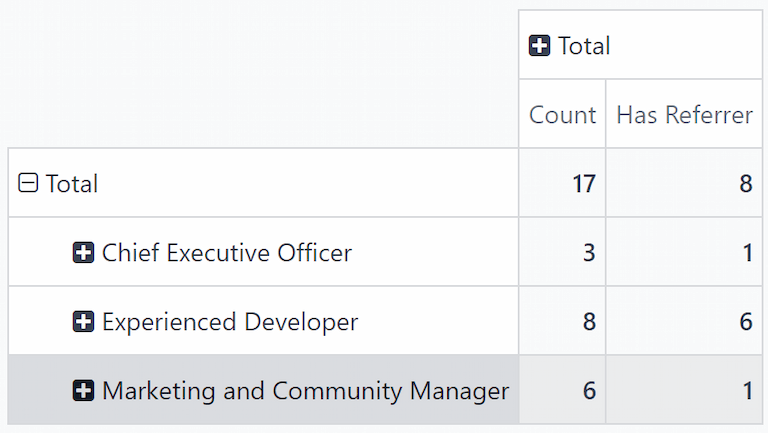
In this example, the Experienced Developer job position has the most applicants from referrals. Out of the eight applicants, six have applied through a referral from a current employee. Meanwhile, the Marketing and Community Manager job position has the least amount of referrals out of the total applicants, only one out of six.
Được tuyển dụng thông qua giới thiệu
Có thể sửa đổi báo cáo này thêm nữa để xem có bao nhiêu ứng viên được giới thiệu cuối cùng được tuyển dụng.
Để xem dữ liệu này, nhấp vào hàng [vị trí công việc], sẽ hiển thị menu thả xuống. Sau đó, nhấp vào State để hiển thị các trạng thái khác nhau mà ứng viên hiện đang ở.
Ghi chú
Chỉ những trạng thái có ứng viên mới được hiển thị cho mỗi vị trí công việc. Nếu một trạng thái không có bất kỳ ứng viên nào, nó sẽ không xuất hiện trong danh sách.
Để mở rộng các hàng khác và hiển thị các trạng thái khác nhau, nhấp vào nút [vị trí công việc].
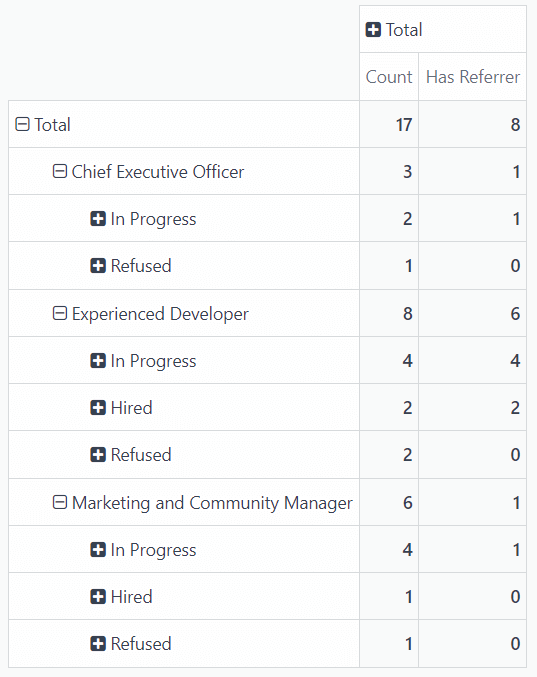
Trong ví dụ này, vị trí công việc Nhà phát triển kinh nghiệm là thành công nhất về mặt giới thiệu nội bộ. Cả hai nhân viên được tuyển đều đến từ giới thiệu nội bộ. Trong khi đó, chưa có nhân viên nào được tuyển cho vị trí Giám đốc điều hành, và nhân viên duy nhất được tuyển cho vị trí Quản lý marketing & cộng đồng không phải do nhân viên giới thiệu.
In this scenario, it is possible to determine that the current software developers are providing the most referrals, with the highest success rate.