
Thuế linh hoạt (vị trí tài chính)
Khi điều hành doanh nghiệp, bạn có thể cần áp dụng các loại thuế khác nhau và ghi lại giao dịch trên nhiều tài khoản khác nhau dựa trên vị trí và loại hình kinh doanh của khách hàng và nhà cung cấp.
The fiscal positions feature enables you to establish rules that automatically select the right taxes and accounts used for each transaction.
Cấu hình
To enable the feature, go to , scroll down to the Accounting section, and enable Flexible Taxes.
Then, set a default fiscal position that should be applied to all sales in the selected POS in the Default field. You can also add more fiscal positions to choose from in the Allowed field.
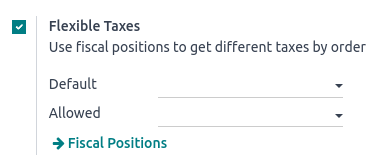
According to the fiscal localization package activated, several fiscal positions are preconfigured and can be set and used in POS. However, you can also create new fiscal positions.
Ghi chú
If you do not set a fiscal position, the tax remains as defined in the customer taxes field on the product form.
Use fiscal positions
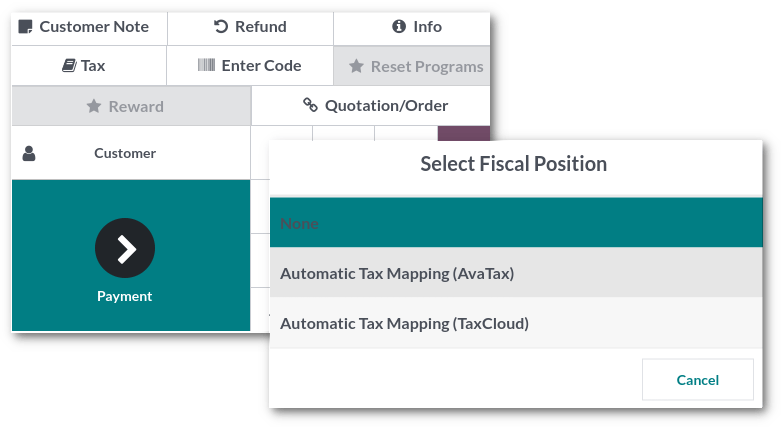
Open a POS session to use one of the allowed fiscal positions. Then, click the Tax button next to the book-shaped icon and select a fiscal position from the list. Doing so applies the defined rules automatically to all the products subject to the chosen fiscal position's regulations.
Ghi chú
If a default fiscal position is set, the tax button displays the name of the fiscal position.