
Tích hợp USPS
Integrating a USPS account with Odoo's Inventory app makes it possible to calculate delivery rates and generate delivery labels within Odoo. This is accomplished by enabling the USPS shipping connector, then configuring at least one shipping method.
Kích hoạt trình kết nối vận chuyển
To enable the USPS shipping connector, open the app from the main Odoo
dashboard. In the Search field, search for USPS and click Install.
Sau khi trình kết nối vận chuyển được cài đặt, trình kết nối USPS được bật theo mặc định.
Cấu hình tài khoản doanh nghiệp USPS
A USPS business account is required to obtain the information needed to fill out the fields in the shipping method form. To create a new account, navigate to USPS's Create Your USPS.com Account page, select the Business Account option, then follow the steps.
Tạo ứng dụng nhà phát triển
Sau khi Cổng thông tin Giới thiệu khách hàng doanh nghiệp USPS (COP) được thiết lập, đăng nhập vào USPS COP để quản lý thông tin tài khoản doanh nghiệp và truy cập API USPS.
Trên trang này, ghi chú lại ID đăng ký khách hàng (CRID), ID người gửi thư chính, và ID người gửi thư nhãn.
Nhấp vào liên kết Ứng dụng của tôi ở đầu màn hình.
Mở tab Developer Apps. Nhấp vào nút Add App. Trong cửa sổ bật lên Add App, chỉ định App Name. Chọn các API để sử dụng. Cuối cùng, nhấp vào nút Add App.
A window opens, titled after the app name. Keep this window open as the shipping method is configured. The Consumer Key and Consumer Secret will be necessary in the shipping method form.
Configure shipping method
Once the USPS shipping connector is enabled, at least one shipping method must be configured. After doing so, the shipping method can be included in sales orders (SOs) and used to compute delivery costs and print shipping labels.
Open or create a new shipping method. Navigate to , then open an existing USPS shipping method to display its form. Alternatively, click New to open a blank form and configure a new shipping method.
Quan trọng
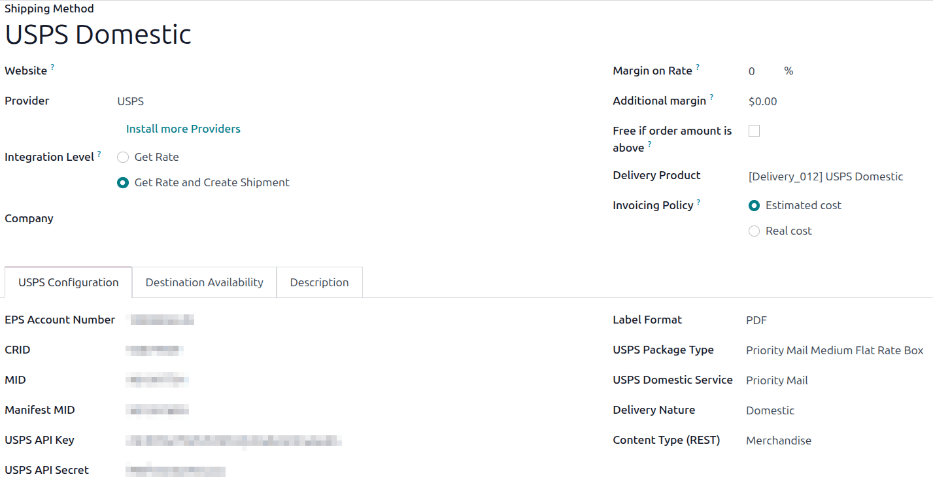
Enabling the USPS shipping connector automatically creates two default shipping methods: USPS Domestic and USPS International. Each of these methods is preconfigured with test credentials, allowing them to be used for testing purposes.
Before the shipping method can be used to create actual shipments, the test credentials must be replaced with credentials from a valid USPS account.
Thông tin chung
At the top of a delivery method form are fields that configure how the method operates in Odoo. In the Provider field, select USPS from the drop-down menu if it is not already selected.
Các trường còn lại trong phần này là chung cho tất cả nhà cung cấp giao hàng. Để biết chi tiết về cách điền vào chúng, hãy xem Đơn vị vận chuyển của bên thứ ba.
Tab Cấu hình USPS
The options in the USPS Configuration tab of a USPS shipping method form are used to connect the method to a USPS account and to configure the delivery details associated with it.
Configure the following fields in the form:
EPS Number: Số tài khoản Enterprise Payment System (EPS) xác định tài khoản thanh toán và được sử dụng cho chuyển khoản điện tử. Sau khi thêm tài khoản thanh toán trong công cụ COP, số EPS sẽ hiển thị hoặc có thể được lấy từ USPS Business Customer Gateway.
CRID: The CRID is a number that identifies a physical business address across all USPS systems and applications.
MID: This is the Master Mailer ID listed in the COP.
Manifest MID: This is the Label Mailer ID listed in the COP.
USPS API Key: This is the Consumer Key credential for the app created in the USPS COP tool.
USPS API Secret: This is the Consumer Secret credential for the app created in the USPS COP tool.
Label Format: Specify the file format that generated labels should use.
USPS Package Type: Specify or select the package type to use for shipping.
USPS Domestic Service or USPS International Service: Specify or select the service level that should be used to generate shipping labels.
Delivery Nature: Specify whether the shipping method is Domestic or International.
Content Type: Specify the type of content that will be shipped in packages with this shipping method.
Trong phần Tùy chọn, cấu hình các trường sau:
Domestic Rating Indicator or International Rating Indicator: USPS uses specific indicators, pricing groups, and automated classification systems to distinguish between domestic and international shipments for rating purposes. These systems help ensure accurate postage calculations based on factors such as destination, package weight, dimensions, and selected mail class. Select the rating indicator that works best for shipping needs.
Danh mục Xử lý: Chọn danh mục xử lý bao bì.
Tạo Nhãn Trả hàng: Chỉ dành cho lô hàng nội địa. Chọn hộp kiểm này để tự động tạo nhãn trả hàng khi đơn giao hàng được xác thực.
Turn on the USPS integration
Sau khi thiết lập kết nối USPS, sử dụng các nút thông minh ở đầu biểu mẫu để xuất bản, bật chế độ sản xuất hoặc kích hoạt ghi nhật ký gỡ lỗi.
Unpublished / Published: Determines if this shipping method is available on the user's eCommerce website.
Test Environment / Production Environment: Determines whether label creation is for testing and canceled immediately (Test) or generating a real shipping label that is charged to the USPS account (Production).
No Debug / Debug Requests: Determines whether API requests and responses are logged in Odoo (turn on developer mode and go to ).