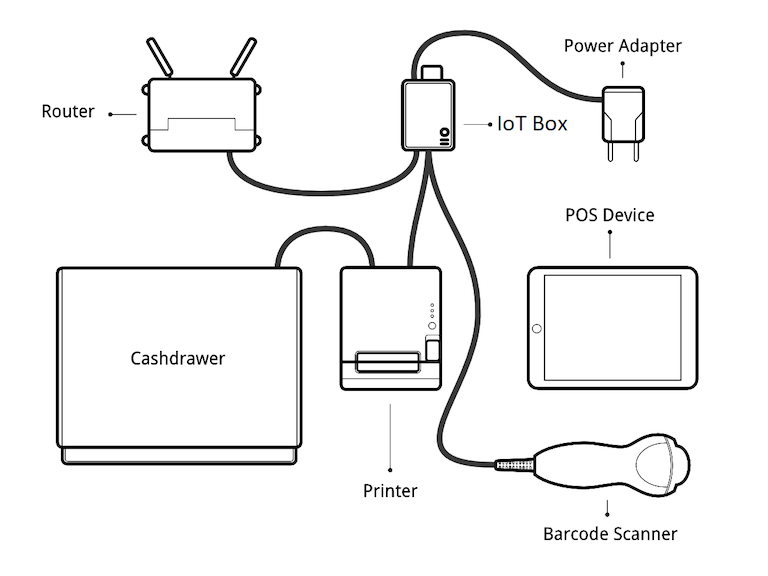
Kết nối hệ thống IoT
Để kết nối POS với hệ thống IoT:
Đảm bảo cả ứng dụng POS và Internet of Things (IoT) đều được cài đặt trên cơ sở dữ liệu của bạn.
Thiết lập Hộp IoT hoặc Windows virtual IoT.
Kết nối các thiết bị ngoại vi với hệ thống IoT:
Thiết bị
Hướng dẫn
Máy in
Connect a supported receipt printer to a USB port or to the network, and power it on. Refer to Orders printing.
Ngăn kéo tiền mặt
Ngăn kéo tiền mặt nên được kết nối với máy in bằng cáp RJ25.
Máy quét mã vạch
Máy quét mã vạch phải kết thúc mã vạch bằng ký tự
ENTER(keycode 28) để máy quét mã vạch tương thích. Đây có thể là cấu hình mặc định của máy quét mã vạch.Cân
Connect the scale and power it on. Refer to Kết nối cân.
Màn hình cho khách hàng
Connect a screen to the IoT box to display the PoS order. Refer to Připojte obrazovku.
Thiết bị thanh toán
Quy trình kết nối phụ thuộc vào thiết bị. Tham khảo tài liệu thiết bị thanh toán.
Access the POS settings and select your POS, or click the vertical ellipsis button (⋮) on a POS card and click Edit. Scroll down to the Connected Devices section, enable IoT Box, then select the devices to be used for the POS. Click Save.
Mẹo
Click IoT Devices to access the list of Thiết bị for your POS and view their connection status. Click a card to access the device's form.
Xem thêm
Ví dụ thiết lập