
Quản lý tài khoản người dùng
In Odoo's Lunch application, users pay for products directly from their Lunch app account. For funds to appear in their account, a Lunch app manager must transfer funds into each user's account.
Quan trọng
To add funds and manage user accounts, the user must have Administrator access rights set for the Lunch application. This is verified by navigating to . Then, click on a user to view their various settings and access rights.
Để biết thêm thông tin, hãy tham khảo tài liệu Quyền truy cập.
The Lunch application does not directly interface in any way with software or products linked to any monetary accounts or billing. Money cannot be transferred from users' bank accounts, nor can users' credit cards be charged.
Odoo's Lunch application only allows for manual entries of cash exchanges that are handled by the Lunch app manager. It is up to each individual company to create the method with which lunch accounts are replenished.
Example
Một số ví dụ về cách tổ chức và chuyển tiền trong công ty:
Cash is handed to the Lunch app manager, who then updates the user's account.
Money is automatically deducted from the user's paychecks, then the Lunch app manager updates the account when paychecks are issued. This requires adding a salary attachment for the user's payslip in the Payroll app.
Companies can sell "lunch tickets" at a set price (for example, one ticket costs $5.00). Users can purchase tickets from a Lunch app manager, who then updates the user's account.
Chuyển tiền
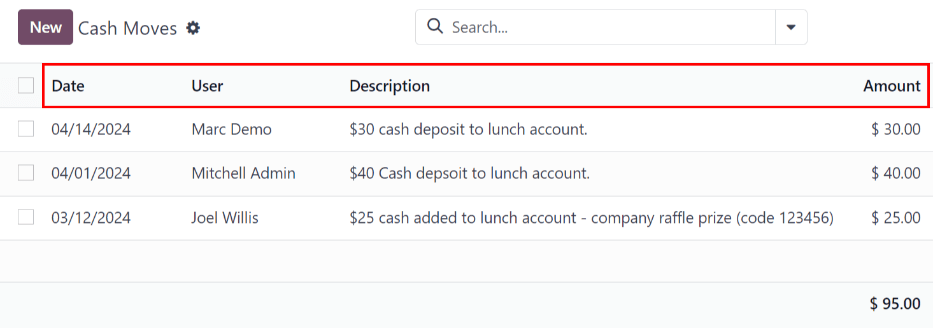
Để thêm tiền vào tài khoản người dùng, mỗi giao dịch tiền mặt phải được ghi lại riêng lẻ. Để xem tất cả bản ghi giao dịch tiền mặt hoặc tạo giao dịch tiền mặt mới, điều hướng đến . Thao tác này sẽ hiển thị bảng điều khiển Giao dịch tiền mặt.
Trên bảng điều khiển Giao dịch tiền mặt, tất cả các giao dịch tiền mặt được hiển thị trong chế độ xem danh sách mặc định, hiển thị Ngày, Người dùng, Mô tả và Số tiền của mỗi bản ghi. Tổng của tất cả các giao dịch tiền mặt được hiển thị ở cuối cột Số tiền.
Thêm tiền
Để thêm tiền vào tài khoản bữa trưa, nhấp vào nút Mới, nằm ở góc trên bên trái của bảng điều khiển Giao dịch tiền mặt.
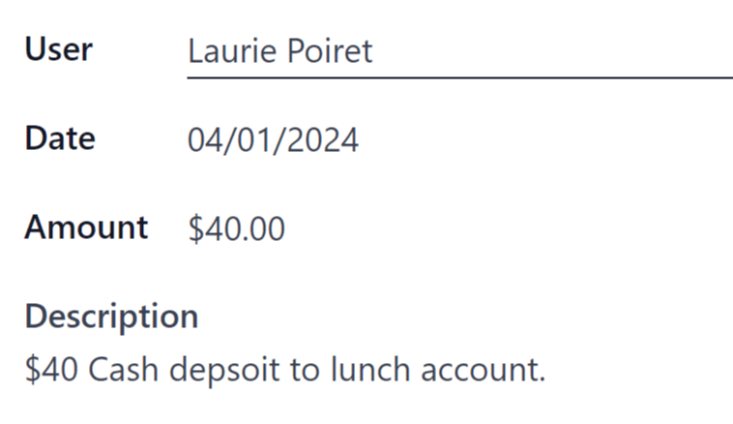
Biểu mẫu Giao dịch tiền mặt trống sẽ tải lên. Nhập thông tin sau vào biểu mẫu:
Người dùng: chọn người dùng nạp tiền mặt vào tài khoản của họ từ menu thả xuống. Nếu người dùng không có trong cơ sở dữ liệu, họ có thể được tạo bằng cách nhập tên của họ vào trường Người dùng, và nhấp vào Tạo "người dùng" hoặc Tạo và chỉnh sửa... để tạo người dùng và chỉnh sửa biểu mẫu Tạo Người dùng.
Ngày: sử dụng cửa sổ bật lên lịch, chọn ngày giao dịch xảy ra.
Số tiền: nhập số tiền được thêm vào tài khoản bữa trưa.
Mô tả: nhập mô tả ngắn gọn về giao dịch.
Kiểm soát tài khoản
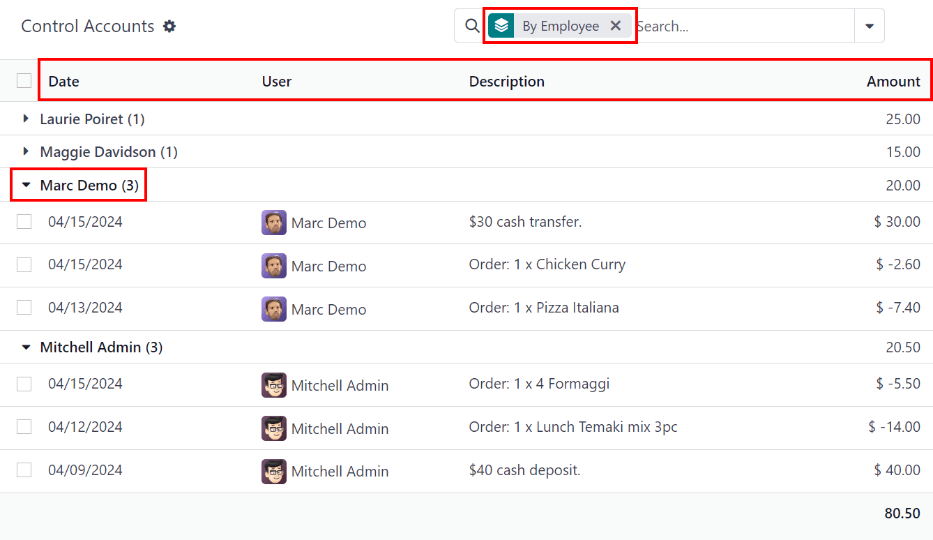
An overview of every transaction in the Lunch app, including all cash deposits and purchases, can be viewed on the main Control Accounts dashboard. To access this dashboard, navigate to
Tất cả các giao dịch được nhóm Theo Nhân viên, và được liệt kê theo thứ tự bảng chữ cái theo tên của người dùng. Ở cuối tên người dùng, một con số xuất hiện. Điều này cho biết số lượng bản ghi cá nhân được ghi lại cho người dùng đó.
The default view is to have all individual transactions hidden. To view all transactions for a user, click the ▶ (triangle) icon to the left of the desired name to expand that specific group.
Mỗi bản ghi bao gồm Ngày, Người dùng, Mô tả, và Số tiền.
Quan trọng
This list only displays the various transactions within the Lunch app, and does not allow modifications to be made to any records listed.
Các giao dịch tiền mặt có thể được sửa đổi, nhưng chỉ từ bảng điều khiển Giao dịch Tiền mặt, không phải từ bảng điều khiển Kiểm soát Tài khoản.
Không thể sửa đổi bất kỳ bản ghi nào liên quan đến sản phẩm.