
Các Tiểu Vương Quốc A-rập Thống Nhất
Cài đặt
Install the following modules to get all the features of the United Arab Emirates localization:
Tên |
Tên kỹ thuật |
Mô tả |
|---|---|---|
Các Tiểu Vương quốc Ả Rập Thống nhất - Kế toán |
|
Default fiscal localization package. Includes all accounts, taxes, and reports. |
U.A.E. - Bảng lương |
|
Obsahuje všechna pravidla, výpočty a struktury mezd. |
U.A.E. - Bảng lương với Kế toán |
|
Obsahuje všechny účty související s mzdovým modulem. |
United Arab Emirates - POS |
|
Includes the UAE-compliant POS receipt. |

Hệ thống tài khoản
Truy cập để xem tất cả tài khoản mặc định có sẵn trong gói bản địa hóa UAE. Bạn có thể lọc theo Mã bằng cách sử dụng các số ở bên trái hoặc bằng cách nhấp vào . Bạn có thể Bật/Tắt chức năng đối chiếu hoặc cấu hình các tài khoản cụ thể theo nhu cầu.
Quan trọng
Always keep at least one receivable account and one payable account active.
It is also advised to keep the accounts below active, as they are used either as transitory accounts by Odoo or are specific to the UAE localization package.
Mã
Tên tài khoản
Loại
102011
Khoản phải thu
Khoản phải thu
102012
Khoản phải thu (POS)
Khoản phải thu
201002
Phải trả
Phải trả
101004
Ngân hàng
Ngân hàng và tiền mặt
105001
Tiền mặt
Ngân hàng và tiền mặt
100001
Luân chuyển thanh khoản
Tài sản lưu động
101002
Biên lai chưa liên kết
Tài sản lưu động
101003
Khoản chi chưa thanh toán
Tài sản lưu động
104041
VAT Input
Tài sản lưu động
100103
VAT Receivable
Tài sản dài hạn
101001
Tài khoản tạm thời ngân hàng
Nợ ngắn hạn
201017
VAT Output
Nợ ngắn hạn
202001
End of Service Provision
Nợ ngắn hạn
202003
VAT Payable
Nợ dài hạn
999999
Lãi/lỗ chưa phân bổ
Thu nhập năm hiện tại
400003
Lương Cơ bản
Chi phí
400004
Housing Allowance
Chi phí
400005
Transportation Allowance
Chi phí
400008
End of Service Indemnity
Chi phí
Thuế
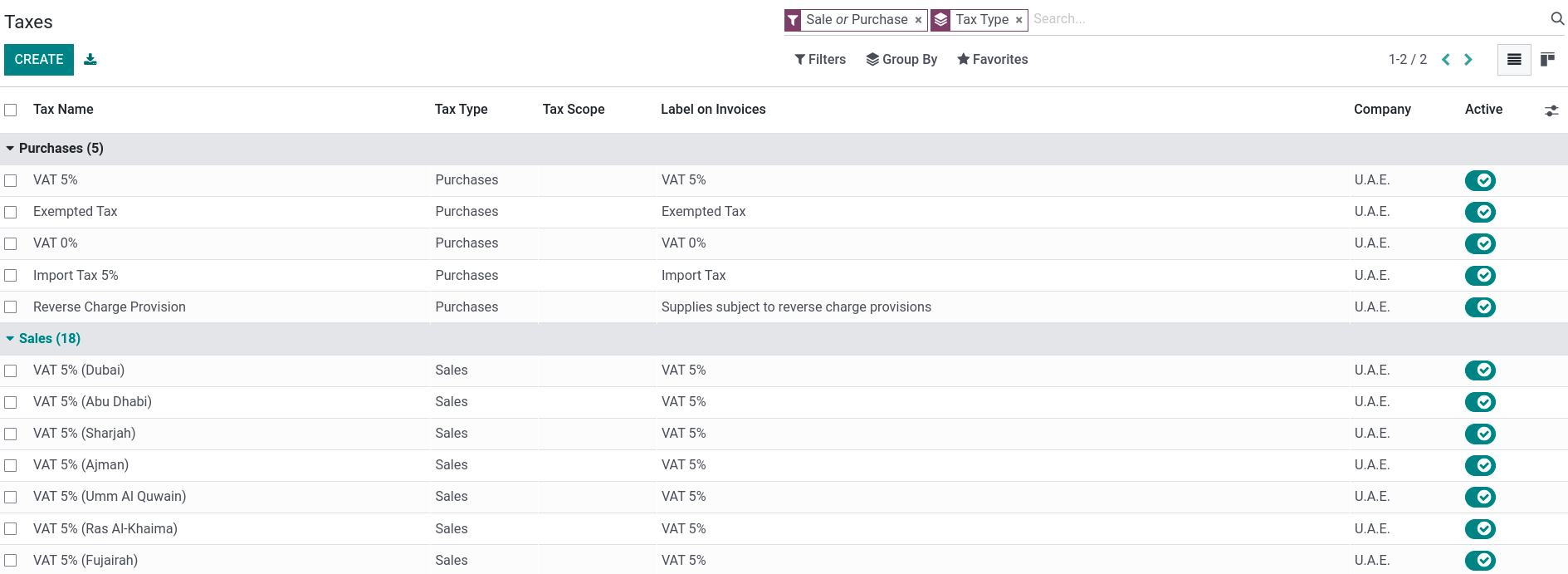
Để truy cập vào các loại thuế của bạn, hãy vào . Kích hoạt/hủy kích hoạt hoặc cấu hình các loại thuế có liên quan đến doanh nghiệp của bạn bằng cách nhấp vào chúng. Hãy nhớ chỉ thiết lập các tài khoản thuế cho nhóm thuế 5%, vì các nhóm khác không cần phải khoá sổ. Để thực hiện, hãy bật chế độ lập trình viên và vào . Sau đó, thiết lập Tài khoản thuế hiện tại (phải trả), Tài khoản thuế hiện tại (phải thu) và Tài khoản thanh toán thuế tạm ứng cho nhóm 5%.
Ghi chú
The RCM is supported by Odoo.
Tỷ giá hối đoái
To update the currency exchange rates, go to . Click on the update button (🗘) found next to the Next Run field.
To launch the update automatically at set intervals, change the Interval from Manually to the desired frequency.
Ghi chú
By default, the UAE Central Bank exchange rates web service is used. Several other providers are available under the Service field.
Bảng lương
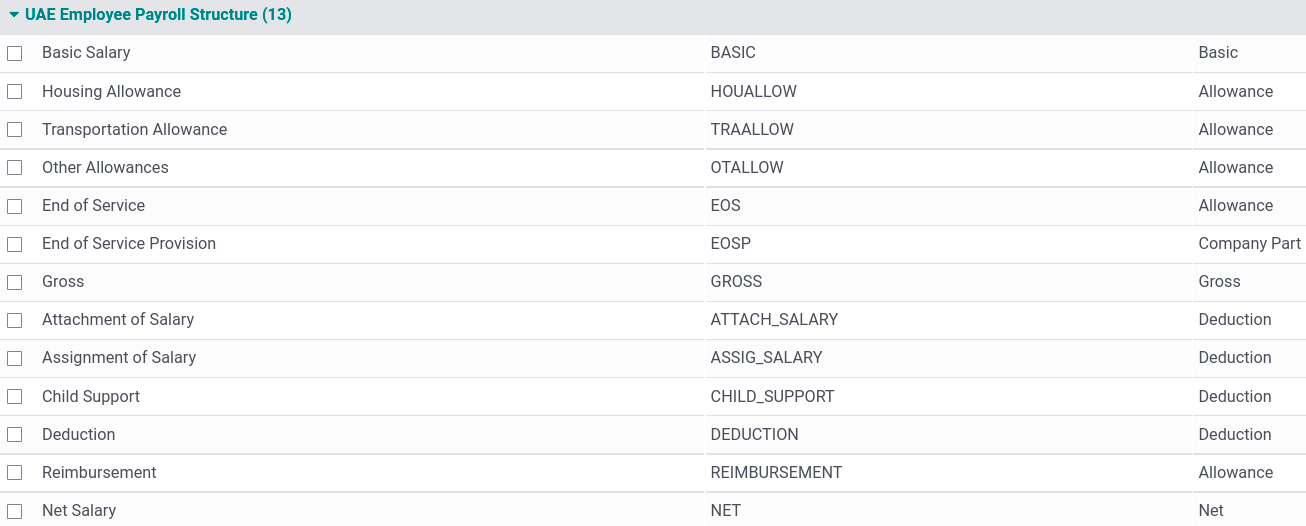
The UAE - Payroll module creates the necessary salary rules in the Payroll app in compliance with the UAE rules and regulations. The salary rules are linked to the corresponding accounts in the chart of accounts.
Quy tắc lương
To apply these rules to an employee's contract, go to and select the employee's contract. In the Salary Structure Type field, select UAE Employee.

Under the Salary Information tab, you can find details such as the:
Wage;
Phụ cấp nhà ở;
Phụ cấp đi lại;
Phụ cấp khác;
Number of Days: used to calculate the end of service provision.
Ghi chú
Leave deductions are calculated using a salary rule linked to the unpaid leave time-off type;
Any other deductions or reimbursements are made manually using other inputs;
Overtimes are added manually by going to ;
Salary attachments are generated by going to . Then, Create an attachment and select the Employee and the Type (Attachment of Salary, Assignment of Salary, Child Support).
Mẹo
To prevent a rule from appearing on a paycheck, go to . Click on UAE Employee Payroll Structure, select the rule to hide, and uncheck Appears on Payslip.
End of service provision
The provision is defined as the total monthly allowance divided by 30 and then multiplied by the number of days set in the field Number of days at the bottom of a contract's form.
The provision is then calculated via a salary rule associated with two accounts: the End Of Service Indemnity (Expense account) and the End of Service Provision (Non-current Liabilities account). The latter is used to pay off the end of service amount by settling it with the payables account.
Ghi chú
The end of service amount is calculated based on the gross salary and the start and end dates of the employee’s contract.
Hóa đơn
The UAE localization package allows the generation of invoices in English, Arabic, or both. The localization also includes a line to display the VAT amount per line.